No App Required
Customers can open menu directly in browser
menuVyo
Getting everything ready for you.


DIGITAL MENUS FOR MODERN RESTAURANTS
Set up your restaurant, create categories and menu items,
add offer banners, generate a QR code and share a live menu
with your customers — all with menuVyo.

Customers view menus without installing an app
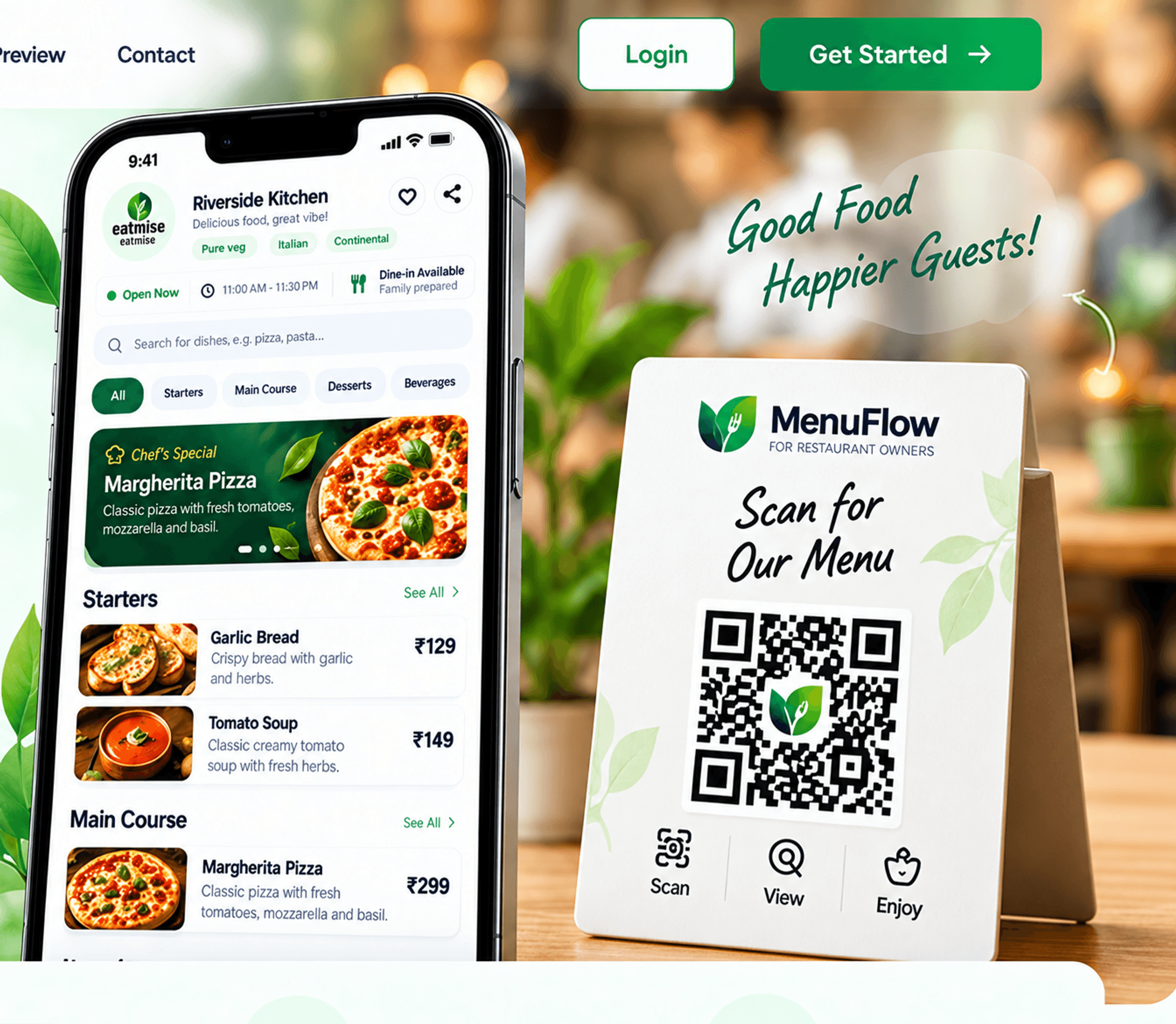
menuVyo is a digital menu maker for food businesses in India. Create an online restaurant menu with dishes, photos, prices and offers, then share it through a QR code. Customers view your published menu in their browser.
Keep one menu link for your business. Update dishes and prices without reprinting the QR code, and let guests browse a contactless digital menu without an app.
Learn how to create your QR menuRestaurant owners, cafés, food shops, hotels and cloud kitchens can organize their menus with categories, photos and size-based prices.
Explore digital menu featuresCustomers can open menu directly in browser
Generate QR code instantly
Change menu, offers anytime
Simple and easy to use for everyone
Share with your customers instantly


Get your digital menu live in just a few simple steps.
Set up your restaurant information, contact details and basic settings.
Add food categories like Starters, Main Course, Desserts, Beverages etc.
Add your food items with name, description, price and images.
Get a unique QR code for your restaurant instantly.
Display the QR at your restaurant and let customers view your live menu.
Create and manage your digital menu in one place. The previews below use sample dishes, prices, offers and counts.
Manage your restaurant details, contact info, timings and more.
Create and organize food categories for your menu.
Add food items with images, descriptions and prices.
Create attractive offers and banners to highlight special deals.
Generate and download QR code for your restaurant.

Beautiful live menu for your customers, accessible on any device.
Get an overview of your restaurant setup and manage everything easily.
Customize your menu appearance and control what customers see.
Manage your restaurant, menu, QR and all
settings from a single, powerful dashboard.
A beautiful and easy-to-navigate menu on your customers’ mobile devices.
Customers open their phone’s camera app.
They scan your restaurant’s QR code.
Your menu opens instantly in their browser — no app required!
Simple Scan
Great Food!
Answers about creating and sharing your menuVyo digital menu.
menuVyo is a digital QR menu management platform. Food business owners add dishes, photos, categories, prices and offers, then share a published menu through a QR code or link.
A digital QR menu is an online restaurant menu linked to a QR code. Guests scan the code with their phone camera to browse dishes and prices in a web browser.
Publish your menu, download its QR code and display it at your business. Guests scan the code and open the menu link; they do not need to install an app.
Sign in to the owner dashboard using your mobile number and OTP. Add your business profile, create categories, add dishes and prices, publish your menu and download its QR code.
Yes. Owners can edit dish information, regular prices, discounts and supported S, M and L size prices in the dashboard. Guests see saved changes when they reopen or refresh the published menu.
No. Customers view the published menu in their phone browser after scanning the QR code or opening the menu link.
Yes. Restaurants, cafés, food shops, bakeries, hotels and cloud kitchens can use menuVyo to present food categories, dishes, prices and offers.
menuVyo currently generates one QR code for each published business menu. You can print the same code for multiple tables. Separate table-specific QR codes are not available in this version.
No. This version lets customers browse a digital menu. Online ordering and payments are not available.

READY TO GO DIGITAL?
Create categories, add dishes and prices, and share your restaurant digital menu with a QR code.